E mōhio ana tātou, ko Google Drive he momo ratonga kapua rokiroki me te tukutahi kōnae e whakaratohia ana e Google. Mā tēnei ka taea e ngā kaiwhakamahi te penapena i ā rātou kōnae tukutahi nui katoa puta noa i ngā taputapu, ngā kōnae tiritahi, ngā whakaahua, ngā ataata, ngā tono, ngā reta, me te maha atu o ngā mea i runga i te kapua (e whakaratohia ana e ngā tūmau a Google).
Tikiake Koreutu Tikiake Koreutu
He momo atanga tukutuku a Google Drive, e tuku ana i ngā taupānga tuimotu mō ngā rorohiko Windows me macOS. Ka whakaratohia e ia he 15 GB o te rokiroki kapua kore utu ki te kaiwhakamahi kotahi hei penapena i ā rātou kōnae nui. Ka taea hoki e koe te tiaki i ngā āpitihanga o ngā īmēra ki Google Drive hei uru atu.
I ētahi wā, i a rātou e uru atu ana ki te Google Drive-by, ka pāngia rātou e ngā raruraru noa o te Google Drive, pērā i te Google Drive Access Aukati. I roto i tēnei āhuatanga, ka ngana rātou ki te kimi i te otinga mō te whakatika i te Google Drive Access Aukati. I konei, i roto i te blog, ka kitea e koe he otinga mō te whakaaetanga uru ki ngā puku Google. Engari i mua i te matapaki i ngā otinga, me mōhio tātou ki te take i aukatia ai te urunga ki te puku Google.
Pānuihia ki konei: [Ngā Tikanga Māmā] Me pēhea te tārua i ngā īmēra Gmail mā te ki ngā āwangawanga?
Ngā Take i Whakakahoretia ai te Whakauru ki a Google Drive
Anei ētahi o ngā take noa e ārai ana i te urunga ki te puku Google:
- Kāore te rangatira kōnae i whakaae kia arokitea e koe te kōnae.
- Nā te takiuru ki tētahi atu Pūkete Google.
- Kāore i whakaaetia te urunga nā te mea i tangohia tō whakaaetanga ki te arokite i te kōnae Tuhinga.
- Kāore he hononga ipurangi e whakatūria ana i te huarahi tika.
- Takiuru mā te whakamahi i ngā pūkete Google maha i runga i te pūrere kotahi.
- Nā te pirau me te kino ka puta i te kōnae puku Google.
- Engari, kua taki puta koe i te pūrere, ā, kua ngana koe ki te whakatuwhera i ngā raraunga mai i te puku Google.
- Tāpirihia ngā taipitopito tuakiri hē i te wā e takiuru ana ki te pūkete puku Google.
Koinei ngā take pea mō te hapa "Kua whakakahoretia te urunga ki te Google Drive". Ka taea e tātou te whakaoti i te hapa mā te whakamahi i te kaiwhakahaere whakaaetanga puku Google? Nā, me mōhio tātou ki ngā huarahi/oti ngāwari hei whakaoti i te hapa "Kua whakakahoretia te urunga ki te Google Drive".
Ngā Tikanga Māmā hei Tango i te Hapa i Whakakahoretia te Uru ki te Google Drive
Ki te hiahia koe ki te tango i te hapa "kua whakakahoretia te urunga mai i te puku Google", me whai i ngā tikanga kia tika, kia āta hoki.
Otinga 1: Tikina he Whakaaetanga mai i ngā Kaiwhakamahi hei Whakatuwhera i tētahi Kōnae
Me tika te huarahi e uru atu ai koe, kātahi ka whakapā atu ki te rangatira o te kōnae kia whakaaetia ai te uru atu. Whaia ngā mahi e whai ake nei:
- Tuatahi, Tuwhera te Kōnae tuhinga mā te pāwhiri i te hononga.
- I te whārangi whakaaetanga, pāwhiritia te Pātene Tono Whakauru.
- Kātahi ka tae mai he īmēra ki te rangatira Tau ID Gmail e tono ana kia whakaaetia.
- I a rātou whakaae te tono, ka whiwhi koe i tētahi īmēra.
- I muri i tēnā, ka taea e koe te ngāwari uru atu ki a rātou.
Otinga 2: Te tirotiro i te tūnga o Google Drive
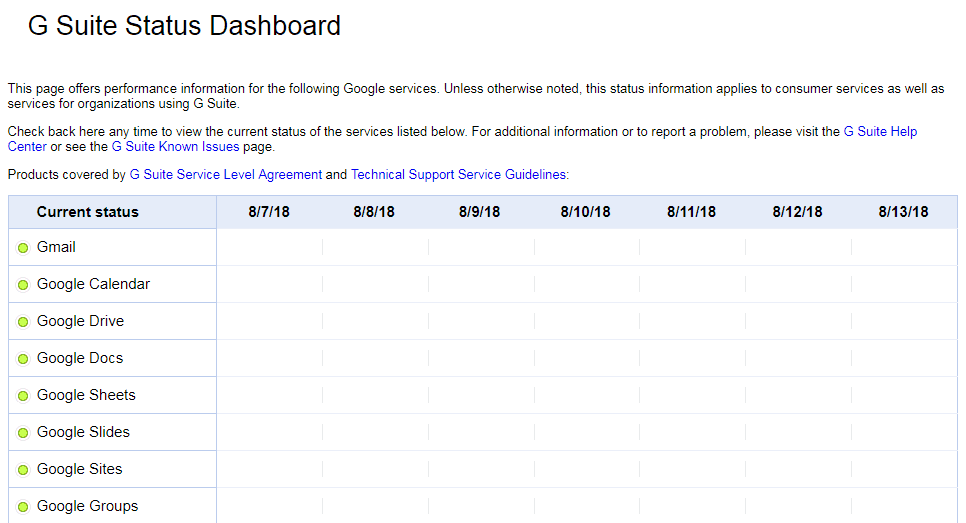
I ētahi wā, nā te mea kāore te puku Google e mahi ana, ka pāngia ngā kaiwhakamahi e ngā hapa "kāore i te whakaaetia te urunga ki te puku Google". I ēnei āhuatanga, ka taea pea e koe te uru atu ki tō pūkete Google. Tuatahi, me tirotiro e koe te tūnga o te puku Google, me te whakarite kei te matomato te pūrongo o ngā ratonga Google kei roto i te G suite.
Otinga 3: Huri ki tētahi Pūtirotiro Hou, ki tētahi Pūrere Hou rānei
Mā te huri ki tētahi pūtirotiro hou, ki tētahi taputapu rānei, ka ea pea te hapa "Kua whakakahoretia te urunga ki te puku Google". I tēnei āhuatanga, me takiuru koe ki tō pūkete i tētahi atu pūtirotiro, taputapu rānei, ā, me tirotiro koe kei te mahi tika te kōnae Google. Me huri koe mai i te Google Chome ki te Mozilla Firefox, Internet Explorer, Opera Mini, me whakamahi rānei i ētahi atu taputapu pēnei i te waea pūkoro, i ngā papa rānei hei uru atu ki ngā kōnae Google Docs. Mā te mahi i ēnei mea katoa ka ea pea te hapa "Kua whakakahoretia te urunga ki te puku Google".
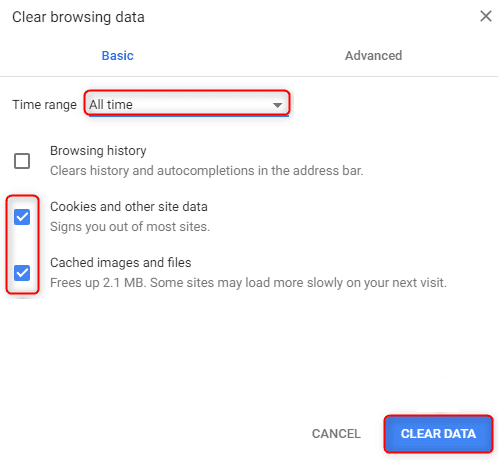
Otinga 4: Horoia/Whakakorea ngā Pihikete me te Keteroki Katoa
Ka puta pea tēnei hapa "Kua whakakahoretia te urunga ki te puku Google" nā ngā pihikete me ngā keteroki i roto i tō pūtirotiro tukutuku i a koe e whakamahi ana i te ipurangi. Nā tēnei hapa, tera pea he raruraru kei roto i te hōputu me te utaina o ngā kōnae puku Google. Nō reira, i roto i tēnei āhuatanga, me horoi e koe ngā keteroki me ngā pihikete katoa kei roto i tō pūkete Google i ia wā, i ia wā. Mā te mahi i tēnā, tera pea ka taea e koe te whakatau i te Whakatika i te Whakakahoretia te Uru ki te Puku Google.
Whāia ngā mahi i raro nei kia āta horoia ngā pihikete me ngā keteroki katoa:
- Tuatahi, pāwhiritia te Tohu kei te taha matau o runga o te mata, tīpako te kōwhiringa Ngā Utauta Anō, kātahi ka pāwhiri i taua.
- Inaianei, whiriwhiri te mārama ngā kōwhiringa raraunga tirotiro.
- Ā, kātahi tīpakohia Katoa wā, kātahi ka pāwhiritia.
- I konei, me whiriwhiri e koe te ngā whakaahua kua keterokihia me ngā kōnae, kātahi ka whiriwhiri i ngā raraunga o te pae kē.
- Hei whakamutunga, pāwhiritia te Ūkui raraunga.
Otinga 5: Te whakamahi i te Aratau Incognito/InPrivate
Mā te mōhio ki ngā urupare a ētahi kaiwhakamahi o te Google Drive, ka whakaratohia e te pūtirotiro tukutuku te aratau incognito, InPrivate rānei, e āhei ai ngā kaiwhakamahi ki te uru atu ki te pūtirotiro me te kore e maumaharatia ā rātou mahi. Mā te whakamahi i tō Google Drive i roto i tēnei ripa incognito/inPrivate ka whakatau pea i te huarahi hei whakatika i te Whakakorenga o te Uru ki te Google Drive.
Whāia ngā kaupae hei whakatuwhera i te aratau Incognito i runga i a Google Chrome:
- Whakarewahia te pūtirotiro ipurangi i runga i tō pūnaha.
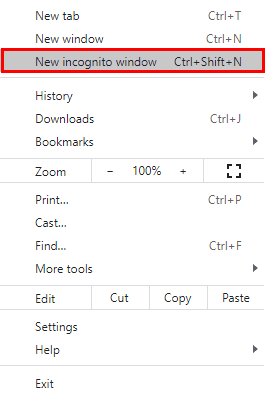
- Inaianei, pāwhiritia te kokonga matau o runga i te pātene Anō kōwhiringa (ngā ira e toru).
- Whai muri i te pāwhiri i tēnā, tīpakohia, ka whakatuwheratia te Matapihi Incognito Hou mai i te tahua taka-iho.
- I konei, ka taea hoki e koe te whakatuwhera mā te pēhi i te Ctrl+Shift+N.
- Inaianei, takiuru ki tō pūkete google i runga i te ripa huna ā, tirohia mēnā e mahi ana, kāore rānei.
Otinga 6: Mā te Mono i ngā Toronga Google
Ko tētahi o ngā otinga hei whakaoti i tēnei raruraru ko te whakakore i ngā toronga kei runga i tō pūtirotiro Chrome e rere ana i te papamuri. Nā te rerekētanga o ngā toronga e rere ana i runga i te tārua, ka pā pea ki a koe te whakakorenga o te urunga ki te puku Google. Nō reira, mā te whakakore i tēnei, ka taea e koe te whakatau i te hapa puku Google.
- Whakatuwheratia he pūtirotiro tukutuku i runga i tō rorohiko.
- Tārua-whakapiri te hononga ki tō whakatere pae: chrome://extensions , kātahi ka haere tonu.
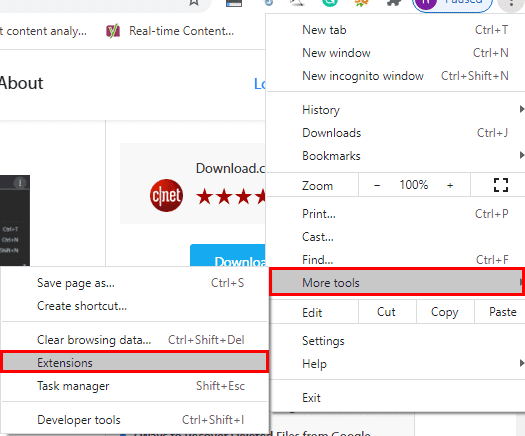
- Ināianei, i roto i te te whakatuwhera i te ruānuku Toronga, Wetekia te pouaka kua whakahohea, kia taea ai e koe te whakakore i te toronga Chrome.
- Hei whakamutunga, ka taea hoki e koe tangohia te toronga mā te pāwhiri i te pātene Para.
Otinga 7: Waitohu atu i tētahi atu pūkete Google mai i te pūtirotiro
Mena ka whakamahia e ngā kaiwhakamahi tētahi pūkete rerekē i runga i tētahi pūrere kotahi, tera pea ka puta he hapa "Kua whakakahoretia te urunga ki te puku Google" nā te mea ka pōhēhē te pūnaha ko wai ka whakaaetia kia mahi i roto i te pūtirotiro. I raro i ēnei āhuatanga, me takiuru koe ki waho o ngā pūkete rerekē katoa o te pūrere, ā, kotahi anake te pūkete e whakamahia ana hei uru atu ki te puku Google i roto i te pūnaha.
Whakamutunga
Ka tino hoha te hapa Google Drive Access Disclaimed mō ngā kaiwhakamahi Google Doc katoa, inā koa kei waenganui koe i tētahi kaupapa, kei te hiahia rānei koe ki te penapena i ngā kōnae nui, ngā ataata, ngā raraunga tāpiritanga, me ngā whakaahua. Nō reira, mā te whakamahi i ā mātou tohutohu matua e whitu mō te Whakatika i te Google Drive Access Disclaimed, ka taea e koe te hoki ki tō pūkete Google Drive i te wā tika.
Tikiake Koreutu Tikiake Koreutu
He pēhea te whai hua o tēnei pou?
Pāwhiritia te whetu hei whakatauranga!
Whakatauranga toharite / 5. Te maha o ngā pōti: